Build vs Buy For In-Product Analytics: What You Might Miss Out

Somewhere inside your company, a product team is debating how to ship customer-facing analytics. The conversation usually starts optimistic and ends with two unappealing options on the whiteboard.
Option one : build it yourself.
Your engineers design the data layer, write the rendering logic, build the filter controls, wire up the permissions model, and deploy the whole thing through your existing CI/CD pipeline. The first version ships in a quarter. The second version takes another quarter. By year two, you have a small team whose entire job is maintaining dashboards that were supposed to be a product feature and has quietly become a product of its own. The running cost sits somewhere between $2M and $3M per year once you count salaries, infrastructure, and the opportunity cost of features that never shipped.
Option two : buy an embedded BI analytics tool.
You get a dashboard builder, pre-built chart types, and a faster path to something your customers can see. But the experience feels bolted on. The embedded iframe looks like a foreign country inside your product. Customization is limited to what the vendor exposes. There is no version control. There is no code review. When something breaks, you file a support ticket and wait.
Neither option is wrong in theory. Both are expensive in practice, just in different currencies.
Where the Build Path Breaks
The appeal of building in-house is control. You own the code, the design, and the deployment. For engineering-led organizations, this feels natural. Analytics is just another product surface.
The trouble starts when analytics stops being a one-time build and becomes an ongoing platform. A customer asks for a new metric. Sales needs a dashboard variant for a different segment. The product team wants drilldown behavior on three existing charts. Each request is small, but each request routes through a sprint.
Within a year, the team maintaining the analytics layer is no longer a few engineers with a side project. It is a permanent squad with its own backlog, its own on-call rotation, and its own set of bugs. The analytics subsystem has become a second product hiding inside the first one.
This is the failure mode of build: the first version is manageable, but every subsequent version competes with your actual roadmap for engineering time.
Where the Buy Path Breaks
The appeal of buying is speed. You integrate a vendor's SDK, configure some dashboards, and embed them in your app. Weeks instead of months.
The failure mode is subtler. It usually shows up six months in, when the product team realizes they cannot change the dashboard layout without asking the vendor for a new feature. Or when the data team discovers that the metric logic lives in a GUI that nobody can diff, review, or roll back. Or when a customer complains that the analytics page looks like it was designed by a different company, because it was!
Embedded BI tools were often built for internal analytics teams first, then extended to handle customer-facing use cases. That origin shows in how awkward he multi-tenancy is, or how shallow and limited the styling controls are, or how the deployment model assumes a small number of internal users rather than thousands of customer accounts. And the embedded pricing, per-user, per-viewer, per-seat penalizes exactly the scaling pattern that embedded analytics requires.
So the product team is stuck. Build costs too much to maintain. Buy costs too much in rigidity. The conversation loops.
The Third Path
There is a third option, and it resolves the tension by combining the parts of build and buy that actually work.
The idea is simple in principle: use visual tooling to design dashboards quickly (the speed of buy), but keep the underlying logic, models, and configuration in code managed through Git (the discipline of build). Add a semantic modeling layer so business definitions stay consistent. Deploy through CI/CD so changes go through review before they reach customers.
This is the operating model behind Holistics Embedded Analytics. Dashboards are built with clicks. They are maintained with code. The analytics surface ships like a product feature because it is governed like one.
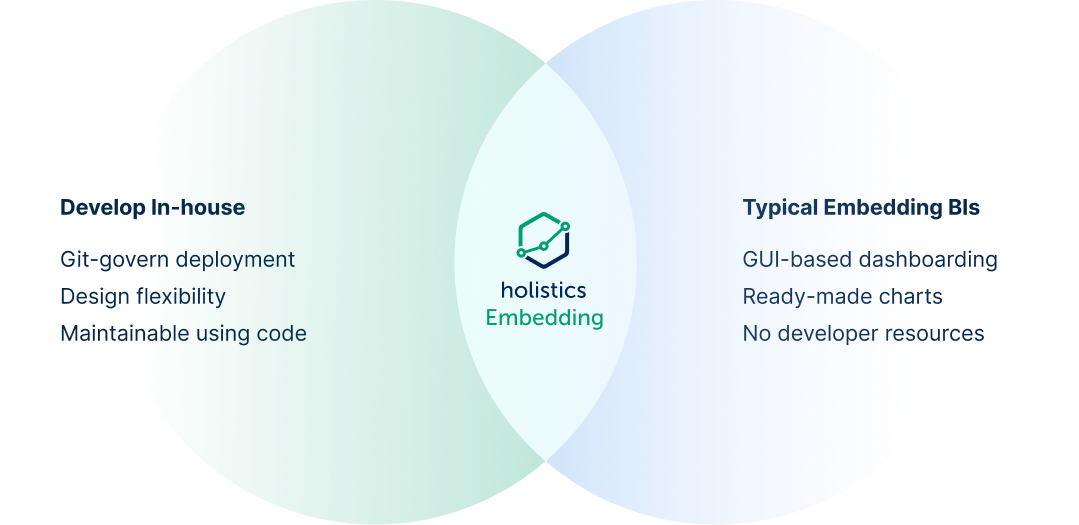
What makes this workable is that engineering teams keep their standards. The modeling layer is code that is version-controlled, reviewable, composable. Dashboard changes can be authored visually by an analyst, then promoted through the same staging-to-production pipeline the engineering team already uses. Permissions are dynamic and API-driven rather than static configuration. Pricing is based on concurrent query capacity rather than per-user seats, so scaling embedded access to customers stays predictable.
The result is a deployment speed comparable to a bought solution, with maintenance patterns that look like in-house software development.
Three independent customer stories illustrate how this plays out.
SensorFlow: 45 Dashboards Migrated in Two Weeks
SensorFlow builds IoT monitoring for hotels and commercial buildings. Their analytics were running on Looker, which worked until Google's acquisition shifted the product's direction and made embedded pricing untenable.
The migration scope was substantial: 45 dashboards, 124 data models, and an active user base that depended on daily access. SensorFlow's team completed the migration to Holistics in two weeks.
Post-migration, the platform hit 88% monthly active usage, a number that tells you the switch preserved user habits. Max Pagel, SensorFlow's CTO, put it directly: "Holistics felt like a Looker that is still being developed, unlike one being mothballed by Google."
Lepaya: Enterprise Embedded Analytics with a Two-Person Team
Lepaya provides learning and development software for enterprise clients. Their customer list includes companies like Dell and KPMG-class organizations. When Lepaya decided to embed analytics into their product, the constraint was clear: enterprise-grade quality, startup-scale team.
They built it with one analyst and one developer. Three months from start to a fully functional embedded dashboard portal using Holistics.
The key was Canvas Dashboards, which gave the analyst enough design control to make the analytics experience feel native to Lepaya's product. When the analyst demoed the result to Lepaya's design team, the response was immediate: "Oh my god, this is incredible." That reaction matters because it signals something specific. The embedded analytics looked like a product feature that happened to show data, indistinguishable from the rest of Lepaya's interface.
Datacubed Health: Embedding Built In from the Start
Datacubed Health builds digital health solutions for clinical trials. Their domain requires HIPAA-compliant analytics delivered to customers at scale. Their previous embedded BI tool was consuming more engineering time on platform maintenance than on delivering actual value.
Datacubed's CTO even offered to do co-marketing with Holistics before becoming a paying customer. The reason, in Vikram Natarajan's words: "Embedding was built into your product from the start, whereas for most companies, it's an afterthought."
That distinction (embedded-first versus embedded-as-extension) is visible in the architecture. Dynamic data sources and row-level security handled multi-tenant isolation without one-off configuration per customer. The deployment model supported HIPAA compliance requirements without custom infrastructure workarounds. The analytics surface scaled with the customer base instead of creating a linear maintenance burden.
For a CTO evaluating embedded analytics vendors, Datacubed's experience highlights a question worth asking early: was this product designed for customer-facing analytics, or was customer-facing analytics added later?
What to Ask During Your Evaluation
If your team is evaluating embedded analytics, here are five questions that separate vendors designed for customer-facing use cases from vendors that bolted on embedding as a feature:
Can the analytics experience match our product's design system? Go beyond color pickers. Can you control typography, layout, spacing, and interaction patterns at a granular level?
How are analytics definitions managed? Look for code-based modeling with Git integration rather than GUI-only configuration that lives outside your review process.
What does the deployment workflow look like? You want staging-to-production promotion with proper review gates before changes reach customers.
How does multi-tenant access control work? Dynamic, API-driven permissions scale. Static per-customer configuration does not.
What is the pricing model at scale? Per-user pricing punishes embedded use cases. Look for usage-based models that align with how your customers actually consume analytics.
The build-versus-buy framing has dominated embedded analytics conversations for years. It persists because many vendors genuinely do force the tradeoff. The tradeoff is a product of how those tools were designed, an artifact of architecture rather than a law of physics. When the analytics layer is visual to build but code to maintain, governed by Git, deployed through CI/CD, and priced for embedded scale, the choice stops being build or buy. It becomes "how fast can we ship, and how well can we maintain it?"
That is a better question to be asking.
Sources

Data Engineer turned Product; writes SQL for a living.