Best AI Analytics Platforms: 13 Tools Reviewed (2026)
We compare 13 AI analytics platforms across semantic depth, governance, reliability, and whether the system gets smarter with use. Includes Holistics, Power BI Copilot, Tableau AI, Looker Gemini, ThoughtSpot, and more.

Work in data long enough and you know how the pitch has been the same for a decade: give business users self-service analytics and they will stop flooding the data team with requests. Yet, drag-and-drop chart builders just moved the problem. Business users stopped asking analysts to write SQL and started asking them to build dashboards, then asked again when the dashboard failed to answer the follow-up question.
That model is breaking down because the expectation has shifted from "give me a dashboard I can filter" to "let me ask a question and get an answer." Natural language, or conversational analytics is the new interface and every major BI vendor, plus a wave of new entrants, is racing to deliver it.
The result is a crowded market where "AI-powered analytics" means wildly different things depending on which vendor is talking. Some tools translate natural language directly into SQL. Others query a governed semantic layer. A few generate composable, analytics-specific query languages. And at least three of the most popular options (ChatGPT, Claude, and Snowflake Cortex) are general-purpose AI that people wire up to databases because their actual BI stack cannot answer questions fast enough.
This guide compares 13 platforms across the dimensions that determine whether AI analytics actually works at organizational scale: semantic depth, governance, reliability, and whether the system gets smarter with use or just generates more one-off answers.
Quick Comparison
| Capability | Holistics AI | Power BI Copilot | Tableau AI | Looker Gemini | ThoughtSpot Spotter | Sigma | Qlik | Zenlytic ZOE | Domo | Snowflake Cortex AI | ChatGPT | Claude | Databricks AI |
|---|---|---|---|---|---|---|---|---|---|---|---|---|---|
| Semantic layer | Rich (AQL) | Basic (DAX) | Thin | Rich (LookML) | Rich (Spotter Semantics) | None | Associative | Rich (Cognitive) | None | None | None | None | None |
| NL querying | ✅ | ✅ | ✅ | ✅ | ✅ | ✅ | ✅ | ✅ | ✅ | ✅ | ✅ | ✅ | ✅ |
| Complex multi-step analysis | ✅ | ❌ | ❌ | ✅ | ❌ | ❌ | ❌ | ✅ | ❌ | ❌ | ✅ | ✅ | ❌ |
| Version control | ✅ Git | ❌ | ❌ | ✅ Git | ❌ | Limited | ❌ | ❌ | ❌ | ❌ | ❌ | ❌ | ❌ |
| AI Skills / custom agents | ✅ | ✅ (Fabric) | Partial | ❌ | Partial | Partial | ❌ | ❌ | Partial | ❌ | ✅ (GPTs) | ✅ (Projects) | ❌ |
| Metric promotion loop | ✅ | ❌ | ❌ | ❌ | ❌ | ❌ | ❌ | ✅ | ❌ | ❌ | ❌ | ❌ | ❌ |
| MCP server | ✅ | ❌ | ✅ | ✅ | ❌ | ✅ | ✅ | ❌ | ❌ | ❌ | ❌ | ✅ | ❌ |
| Best for | Governed AI analytics with semantic depth and version control | Microsoft ecosystem, report summarization | Salesforce ecosystem, visualization-heavy teams | Large Google Cloud enterprises with LookML expertise | Non-technical users needing fast ad-hoc answers | Spreadsheet-comfortable teams on Snowflake/Databricks | Orgs needing conversational + ML in one platform | Mid-market teams wanting governed AI with Python | Broad data platform needs, less governance focus | Snowflake-native teams adding AI to the warehouse | Individual ad-hoc analysis only | Research-grade analysis, MCP integration with BI tools | Databricks Lakehouse-native teams |
Compare all tools side-by-side in our AI BI Tools Comparison Table.
Key Takeaways
Holistics AI is best for data teams that want self-service AI analytics grounded in a governed, programmable semantic layer with full Git version control and a metric promotion loop that makes AI outputs compound over time – and for organizations where engineering-oriented data teams support the BI needs of many non-technical business users.
Looker Gemini is best for large Google Cloud enterprises with existing LookML expertise and huge budget (~$83K+/year average) that need mature semantic governance and are expanding into AI-powered BI.
Power BI Copilot is best for organizations deep in the Microsoft ecosystem where the primary AI use case is report summarization and DAX generation.
Tableau AI is best for Salesforce ecosystem teams where visualization quality and predictive analytics are the primary AI use cases.
Sigma & Domo are best for teams that want AI layered onto a broad end-to-end data platform: Sigma for spreadsheet-comfortable users on Snowflake/Databricks, Domo for all-in-one integration, preparation, and visualization.
Snowflake Cortex AI & Databricks AI are best for engineering teams that want AI capabilities inside the warehouse or lakehouse – powerful building blocks, but both lack a BI-grade semantic layer and work best alongside a dedicated BI tool.
ChatGPT & Claude are best for individual ad-hoc analysis, statistical tests, and data prototyping – excellent research tools, but unsuitable for organizational analytics where governance and consistency matter. Claude's MCP support makes it a strong companion to governed BI tools like Holistics.
Our Worldview on AI Analytics
The semantic layer is the defining differentiator. AI can only produce reliable answers up to the point where the semantic layer can express the question. Tools without one (ChatGPT, Claude, Snowflake Cortex, Domo) rely on raw schema inference, which breaks on any question that requires business context. For more on this concept, see our explanation of the semantic ceiling.
Most BI vendors bolted AI onto existing report-centric architectures. The underlying data model was never designed for machine consumption. The AI hits the same limits the business user was already hitting.
General-purpose LLMs are powerful but ungoverned. ChatGPT and Claude can run sophisticated statistical analysis, generate Python code, and produce polished visualizations from uploaded datasets. For an individual analyst doing exploratory work, they are genuinely excellent. The problem starts when a second person asks the same question and gets a different answer, because the LLM has no shared metric definitions, no row-level security, no institutional memory of how your company defines "active customer" or "net revenue." There is no audit trail, no version control, and no way to enforce consistency across teams. These tools work as research instruments. They fail as organizational infrastructure.
Only two tools support a metric promotion loop: the ability for AI-generated metrics to be reviewed, refined, and promoted into the governed semantic layer so future queries benefit from past work. Holistics AI and Zenlytic ZOE are the only platforms where AI outputs compound into institutional knowledge.
Version control separates governed AI from experimental AI. Only Holistics and Looker offer Git-based version control over analytics definitions. Without version control, AI-generated content has no audit trail, no rollback, and no way to track who changed what.
The Semantic Layer Is the Defining Differentiator
Every AI analytics tool can answer "show me revenue by region." The question is what happens next.
A manager asks for revenue by region, then wants to compare it to last quarter. Then wants to see it as a percentage of total. Then wants to filter for enterprise customers and break it out by product line. Then asks why the number dropped in APAC. Each follow-up is a normal business question. None of them are edge cases.
This is where the semantic ceiling appears. The semantic layer, the centralized definition of business metrics, dimensions, and logic that sits between the warehouse and the user interface, determines how far the AI can go before it starts guessing.
Three levels of semantic depth
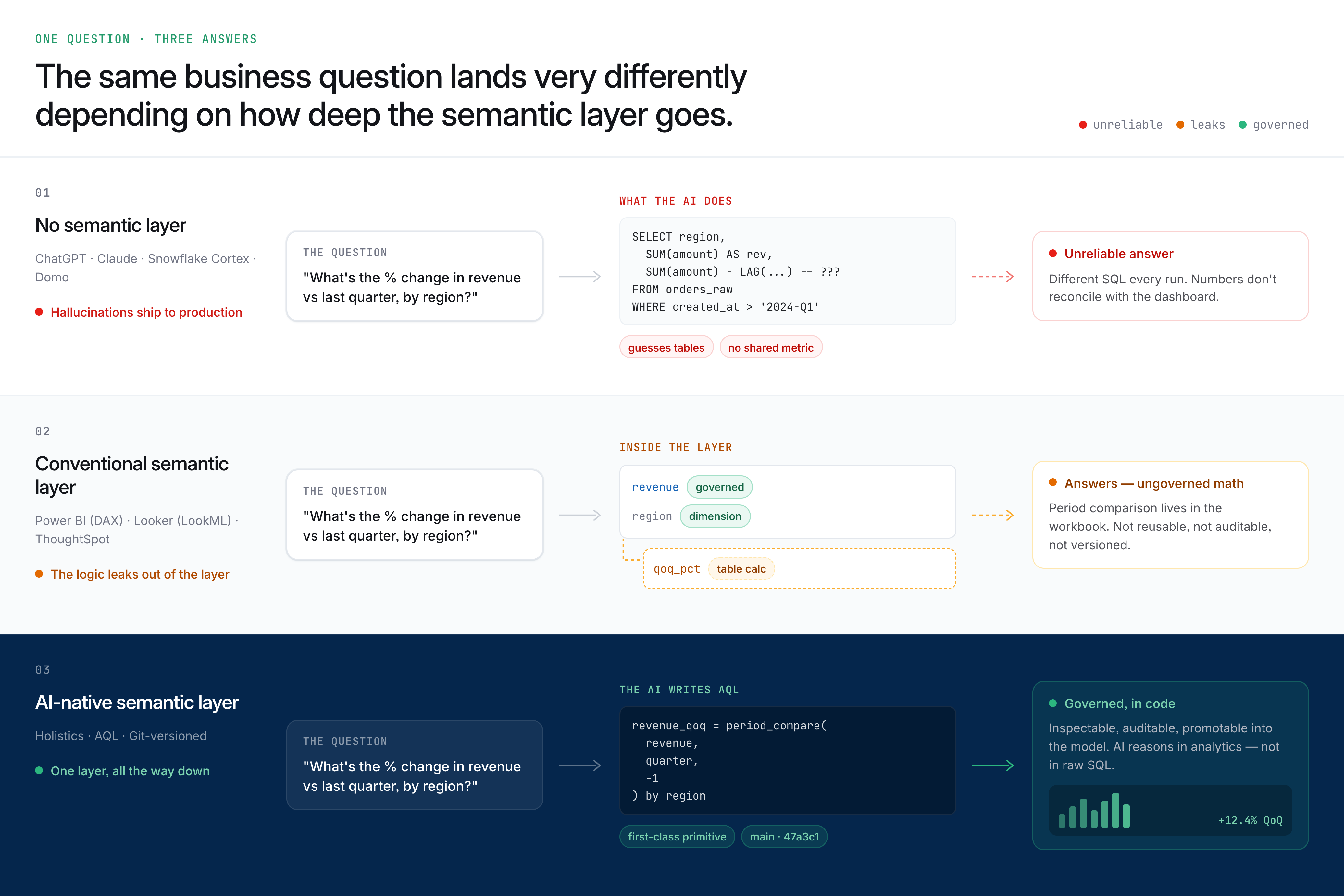
No semantic layer. Tools like ChatGPT, Claude, Snowflake Cortex, and Domo translate natural language directly into SQL against raw tables. The AI infers meaning from column names and data types. "Revenue" might pull gross revenue in one query and net revenue in the next. Two users asking the same question get different numbers. Trust erodes quickly. This is what happens when you skip straight to text-to-SQL without a foundation underneath it.
Conventional semantic layer. Tools like Power BI (DAX), ThoughtSpot (Spotter Semantics), and Looker (LookML) define metrics centrally and constrain AI queries to governed definitions. First-order questions work well. But the intermediary formats these tools use are often too simple to express period-over-period comparisons, nested aggregations, or percent-of-total calculations without falling back to workarounds: table calculations in Looker, calculated fields in Tableau, or manual DAX formulas in Power BI. The logic leaks out of the semantic layer.
AI-native semantic layer. Holistics AI generates AQL (Analytics Query Language), a composable query language where analytical operations like running totals, period comparisons, and cross-grain ratios are first-class primitives. The AI reasons about analytical patterns rather than translating intent into low-level SQL. Because every analytics artifact is code, version-controlled in Git, AI outputs are inspectable, auditable, and promotable into the governed model. For a deeper comparison of how these layers stack up, see our semantic layer BI tools comparison.
Why this matters for AI specifically
Traditional self-service analytics fails when users cannot find the data, cannot trust the numbers, or cannot shape the data into the answer they need. AI inherits all three failure modes. If metric definitions are scattered across dashboards, the AI cannot find the right one. If definitions conflict, the AI cannot determine which one to trust. If the semantic layer cannot express a cohort comparison or a rolling window, the AI cannot shape the answer.
Without a centralized semantic layer, scaling AI access is scaling polished confusion. The answers look better than a blank dashboard. But they are no more reliable. This is where most organizations find themselves on the AI analytics maturity curve: generating answers without generating trust.
Why AI Analytics Platforms Over AI Chatbots on Warehouses
The simplest version of "AI analytics" is connecting ChatGPT or Claude to your data warehouse and asking questions. It works surprisingly well for a demo. It breaks reliably in production.
Here is what you lose when the AI layer has no semantic foundation:
No metric consistency. "Revenue" can mean booking revenue, recognized revenue, or ARR depending on who asks and how they phrase it. A governed semantic layer defines "revenue" once. A raw LLM connection guesses every time.
No governance. There is no row-level security, no column-level masking, no access control. The LLM sees whatever the database connection allows. For any team handling customer data, financial records, or regulated information, this is a non-starter.
No institutional memory. Every conversation starts from zero. The LLM has no idea that "Q3" at your company starts in February, or that the APAC region excludes Japan for historical reporting reasons, or that orders before 2023 include test data. A semantic layer encodes this knowledge. A chatbot forgets it.
No version control. There is no record of what the AI said yesterday. No way to diff between two answers. No audit trail for compliance. If the CFO asks "what number did we use in the board deck," the answer is silence.
No compounding value. When someone figures out the right way to calculate customer lifetime value, that knowledge stays in the chat thread. It never feeds back into a shared system. The next person asking the same question starts over.
When chatbot-on-warehouse works
This approach is genuinely useful for individual analysts doing exploratory work: quick statistical tests on a CSV, prototyping a metric definition, or sanity-checking a number before building it into a dashboard. ChatGPT with Code Interpreter and Claude with analysis mode are excellent at this.
The breakdown happens when more than one person needs the same answer, when the answer needs to be reproducible, or when the answer needs to be governed. Those requirements describe every analytics use case that matters to an organization.
How We Evaluated These AI Analytics Platforms
We evaluate AI analytics tools across seven dimensions. Each one tests a different layer of reliability. A tool can score well on one dimension and fail on another, and the failure matters more than the success. See our AI BI Tools Comparison Table for scored ratings across all dimensions.
Semantic layer depth
How rich is the foundation the AI operates on? This determines the ceiling of what AI can reliably answer. A tool with no semantic layer is guessing from column names. A tool with a rich, composable semantic layer can handle nested aggregations, period comparisons, and cross-grain ratios.
Core AI capabilities
Can the AI handle the full analytics workflow? This includes querying data, enriching the semantic model, and generating analytical content. Most tools handle basic queries. Fewer can generate reusable metrics or build governed dashboards from natural language.
Data context depth
Does the AI understand business definitions, schema structure, and conversational history? Five levels matter: base data literacy, business context, database context, result context, and conversational context. Tools with deeper context produce more reliable answers.
Optimizability
Does the system improve with use? Three capabilities define an optimizable system: a semantic enrichment loop, composable metric logic, and guided learning that surfaces working examples to help users build complex queries.
Output reliability
Are AI-generated outputs inspectable, modifiable, and version-controlled? Can you see exactly what the AI did, change individual steps, and track the history of changes? Without these controls, AI-generated analytics have no more authority than a screenshot in a Slack thread.
Operational scalability
Does the AI help teams grow analytical output without multiplying manual work? This includes contextual scaling, metric generation at scale, and cross-team workflows where business users define and data teams validate.
Security controls
Does the AI respect existing permissions? This includes query execution control (RLS, CLS), input control (what metadata the AI can see), BYOM support (bring your own LLM for data residency and cost control), and logging (audit trail for compliance).
What Are The Best AI BI & Analytics Platforms?
1. Holistics AI
Rich semantic layer Metric promotion Git version controlMost AI analytics tools translate a natural-language question directly into SQL against the raw warehouse schema. The AI has to guess at table joins, canonical date fields, and what business metrics like "revenue" or "active customer" actually mean. The output looks plausible. Often it is silently wrong. Analysts end up verifying every answer.
Holistics AI is built differently. Instead of generating SQL against raw tables, it generates AQL against your governed semantic layer. AQL is a composable query language where metrics are first-class objects: your team's existing definitions of revenue, active customer, retention, and so on. The AI reuses what you have already defined rather than reinventing business logic from scratch.
The chain works like this:
- You define business logic once in AML and AQL: composable, version-controlled, reviewable.
- AI generates AQL (rather than SQL) from a natural-language question, reusing your governed metric definitions.
- Holistics compiles AQL to SQL deterministically, runs it against your warehouse, and returns the result.
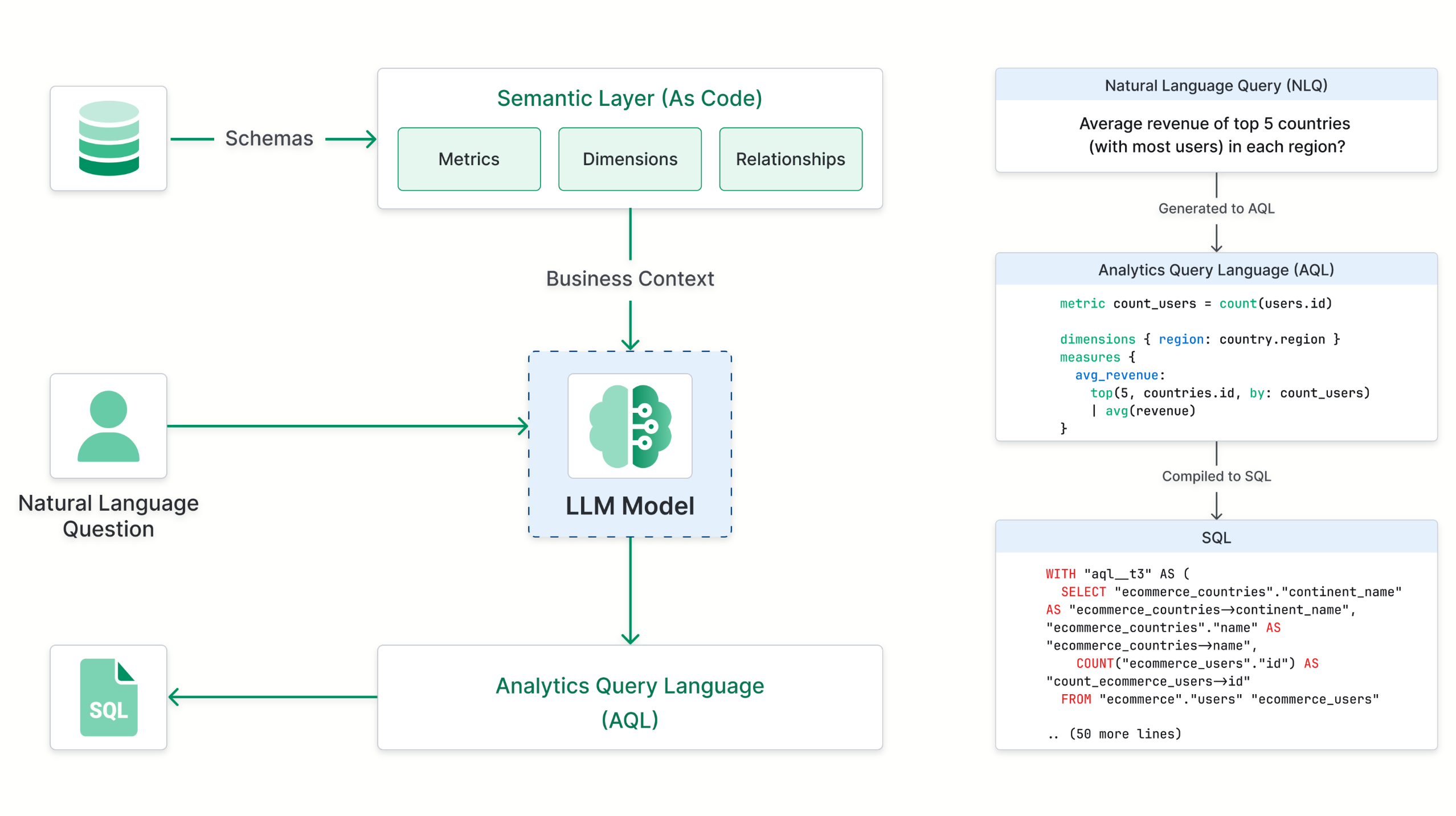
Three foundational pillars enable Holistics to deliver reliable AI-assisted self-service analytics:
- Rich Semantic Modeling Layer. Business metrics, dimensions, and relationships are defined once to provide comprehensive business context for AI.
- Analytics Query Language (AQL). A composable, analytics-centric query language built for AI reasoning. It allows AI to focus on generating high-level analytics logic instead of low-level execution details.
- Analytics Definitions as Code. Every analytics artifact is text-based code that enables AI to easily read existing definitions and generate new ones. Comes with built-in version control and governance.

Key AI capabilities
- Conversational data exploration. Ask questions in natural language with multi-turn context. The AI remembers prior questions in the conversation, so you can drill deeper without starting over.
- AQL-based query generation. The AI composes complex analytical logic using modular AQL operations. Running totals, cohort comparisons, and cross-grain ratios are handled natively without falling back to raw SQL.
- Five-level context system. The AI draws from semantic definitions, organization-level custom instructions, programmable AI Skills, conversation history, and built-in analytical knowledge.
- AI Skills. Admin-defined, reusable AI capabilities assigned per team or user. Each Skill includes custom instructions, tool definitions, and context that shape how the AI responds. Marketing sees marketing datasets, purchasing sees purchasing datasets, automatically.
- Metric promotion loop. AI-generated metrics can be reviewed, refined in the GUI, and promoted into the governed semantic model. Future queries benefit from past work.
- MCP Server. External AI tools (Claude, Cursor, or any MCP-compatible client) can query Holistics' governed metrics natively, making Holistics a data backend for any AI workflow.
- Embedded AI Chat. Embed the AI-powered analytics experience directly into your product so your customers get governed, conversational data access. See our white-label analytics platforms comparison for a deeper look at embedded AI branding and customization.
- AI-assisted modeling. Auto-generate data models, field descriptions, dataset summaries, commit messages, and PR descriptions. Build models faster with AI-powered IDEs like Cursor or Claude Code.
- Analytics-as-code. Models, datasets, metrics, and dashboards live in Git with review, testing, and CI/CD workflows.
2. Power BI Copilot
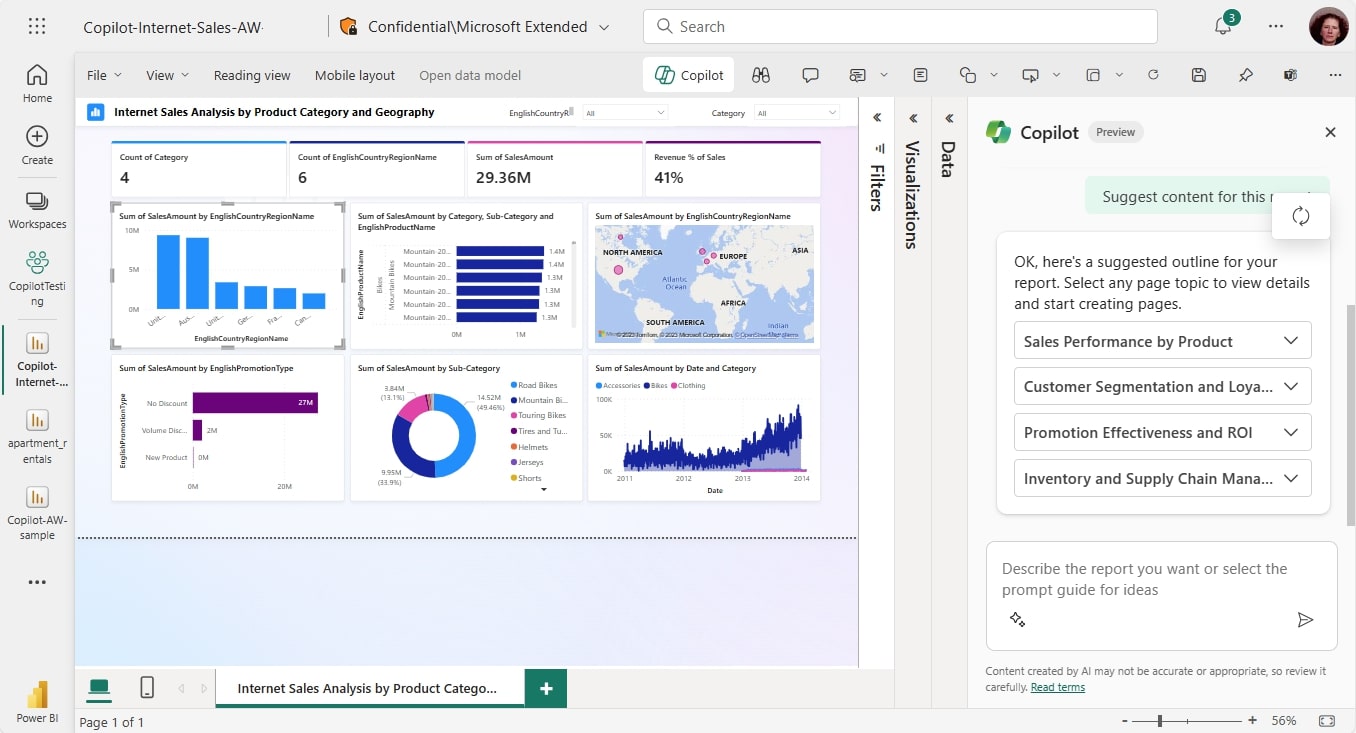
Basic semantic layerPower BI Copilot is Microsoft's generative AI integration, using Azure OpenAI to provide natural language querying, report summarization, and DAX generation within the Microsoft ecosystem. It is now a core workload within Microsoft Fabric.
Key AI capabilities
- DAX query generation. Copilot translates natural language into DAX queries, reducing the learning curve for a notoriously complex formula language.
- Report summarization. Generates natural language summaries of report pages, visual data, and the underlying semantic model.
- Conversational multi-turn. Supports back-and-forth conversational chat grounded in report context (GA April 2026).
- Fabric Data Agents. Developers can create conversational AI agents within Microsoft Fabric, each configured with custom instructions and defined data scope.
3. Tableau AI
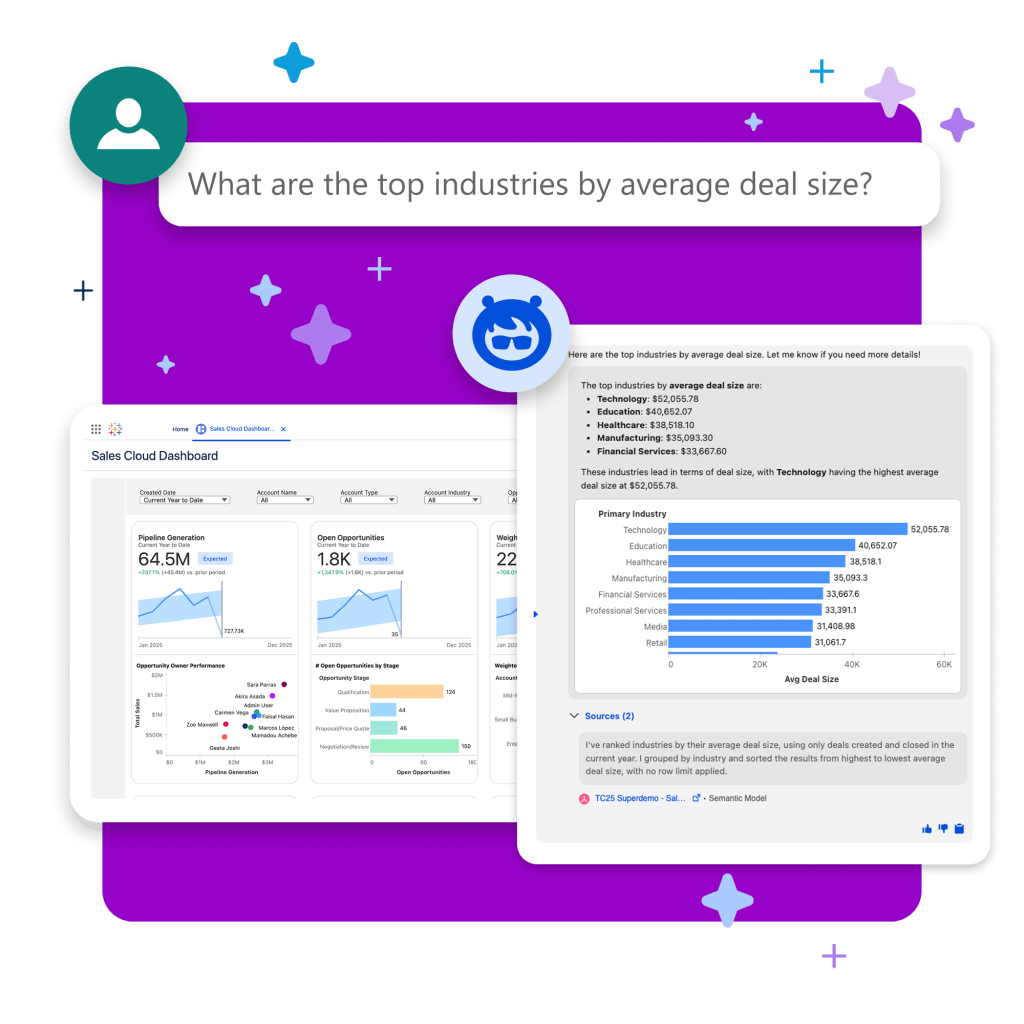
Thin semantic layerTableau's AI capabilities span Tableau Agent (conversational analytics), Tableau Next (an agentic analytics platform), Tableau Pulse (AI-driven metric monitoring), and Einstein Discovery (predictive analytics). The product portfolio is broad but can be confusing to navigate.
Key AI capabilities
- Tableau Agent. Conversational AI for data exploration, chart creation, and multi-step analytical workflows. Supports multiple languages (2026.1 release).
- Tableau Next. An agentic analytics platform with auto-generated semantic models and MCP support for interoperability with external AI tools (GA 2026).
- Tableau Pulse. AI-generated metric summaries, pace-to-goal insights, and anomaly alerts.
- Einstein Discovery. Out-of-the-box forecasting, anomaly detection, and driver analysis with explainable AI.
- Visualization depth. Tableau remains the industry benchmark for visualization richness and design flexibility.
4. Looker Gemini
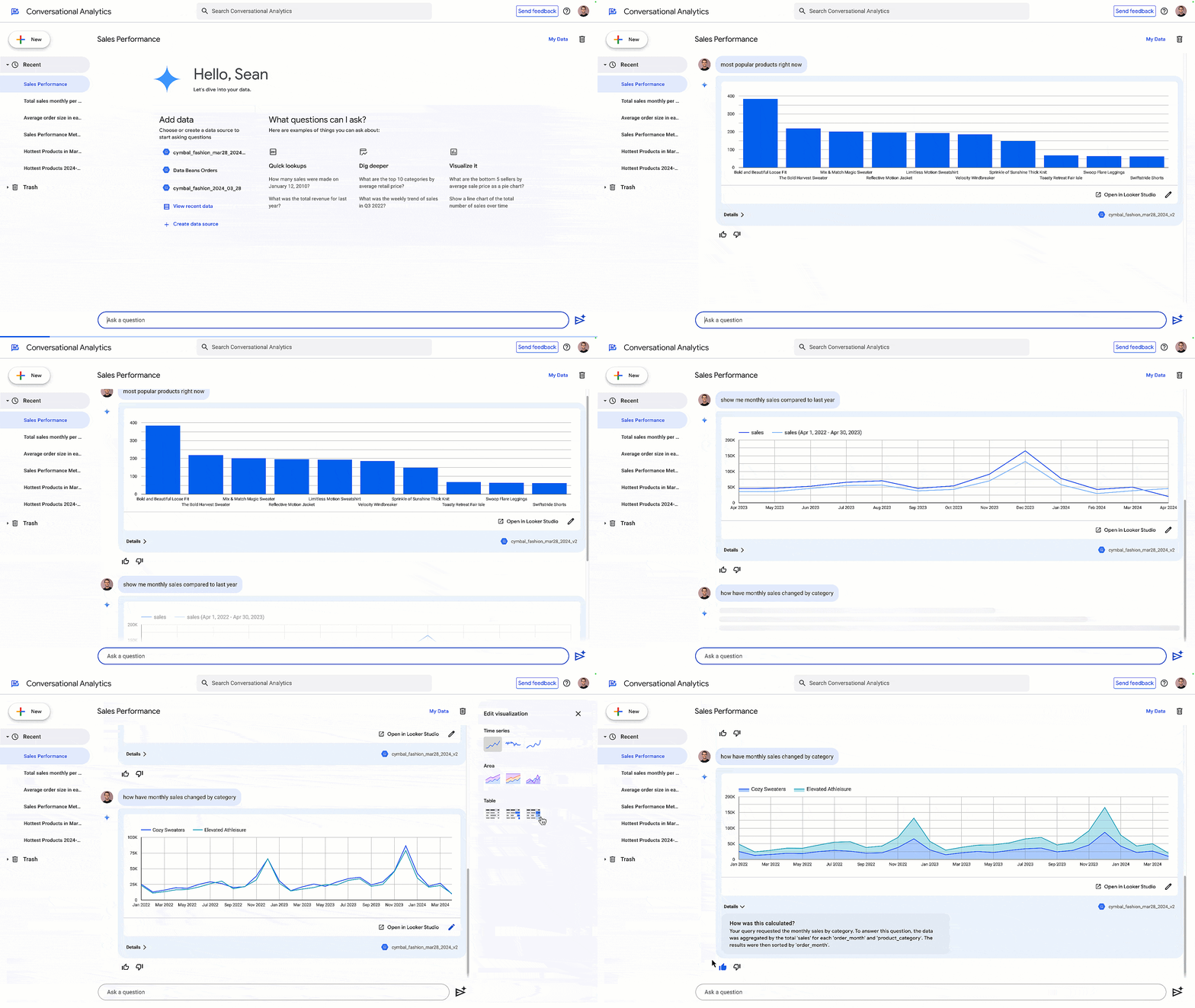
Rich semantic layer Git version controlLooker brings Google's Gemini AI directly into the LookML-governed analytics experience. Google now positions Looker as an "Agentic BI" platform, with capabilities that extend beyond conversational querying into autonomous agents and embedded AI experiences.
Key AI capabilities
- LookML-governed AI. Every AI query runs against the LookML model, ensuring metric consistency through the most mature semantic modeling language in the market.
- Code Interpreter (GA). Enables complex tasks like forecasting, anomaly detection, and multi-step calculations using natural language, without requiring Python expertise.
- Agentic BI capabilities. BI Agents (Preview) trigger downstream business actions. Dashboard Agents provide conversational AI within dashboards. Agentic Workflows automate metric monitoring.
- Developer productivity. Gemini generates LookML parameters and visualization configurations from natural language. A VS Code extension includes a specialized LookML AI Agent.
- MCP server. An open-source MCP Toolbox with a managed server native to Looker (Preview) for connecting data agents to external AI applications.
5. ThoughtSpot Spotter
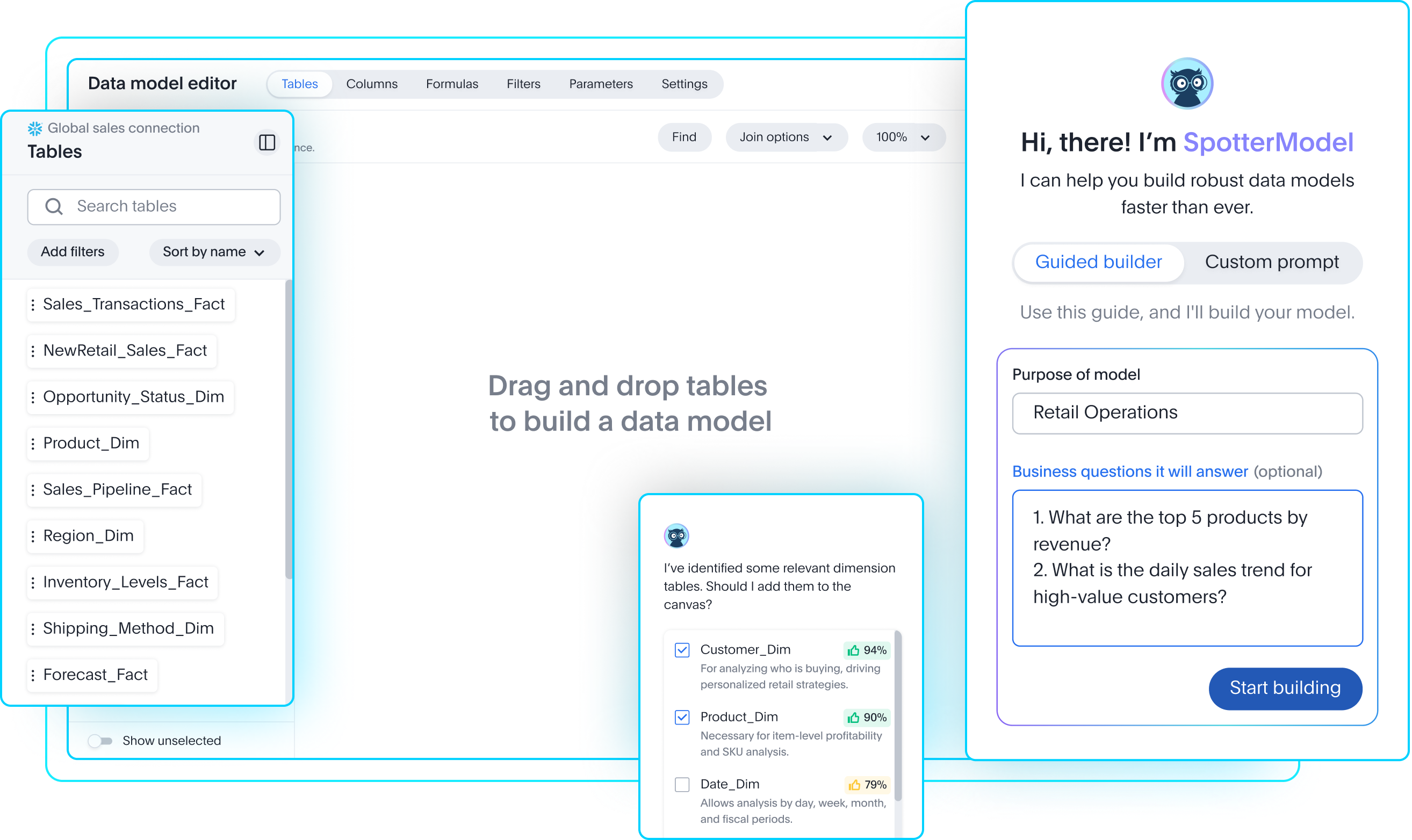
Rich semantic layerThoughtSpot Spotter is built around natural language search, and it remains the fastest path from question to answer for non-technical users. ThoughtSpot now positions itself as an "Agentic Analytics Platform," with Spotter as its core AI agent.
Key AI capabilities
- Strongest natural language search. The search interface is closer to Google Search than to a traditional BI tool. Non-technical users can get answers within seconds.
- Spotter Semantics. A dedicated semantic layer (March 2026) with deterministic reasoning, aggregate awareness, and governed business definitions, a significant upgrade from the original Worksheet model.
- Spotter for Industries. Purpose-built vertical analytics agents for Healthcare, Retail, Financial Services, Tech/Software, Logistics, and Travel.
- SpotIQ. Proactively surfaces anomalies, trends, and correlations.
- Agentic Data Prep. Analyst Studio (formerly Mode) includes AI-driven data preparation.
6. Sigma Computing
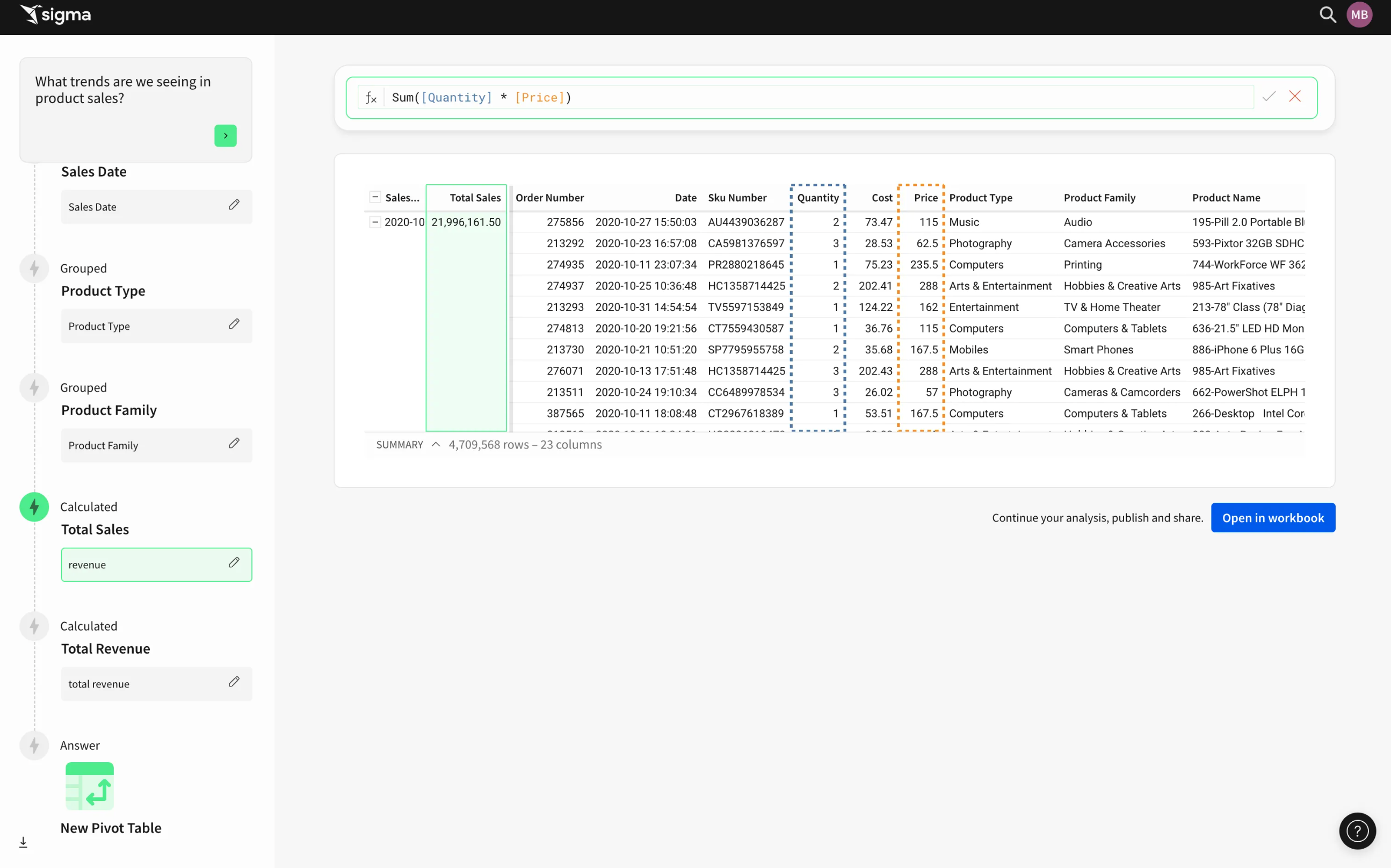
No semantic layerSigma embeds AI directly into the cloud data warehouse layer. Rather than building a separate semantic layer, Sigma lets users call warehouse-native LLMs and build spreadsheet-like analyses with AI assistance.
Key AI capabilities
- Warehouse-native AI. Calls LLMs from Snowflake, Databricks, BigQuery, and Redshift directly, avoiding data movement and inheriting existing warehouse security.
- Sigma Agents (April 2026). Autonomous AI agents that execute writes, trigger REST API calls, fire webhooks, and interface with external systems like Salesforce, Jira, and Slack.
- Sigma Assistant. Natural language interface for locating data sources and building multi-step analyses, showing each step of its decision logic.
- Spreadsheet-familiar interface. Business users work in an Excel-like environment with AI formula assistance.
- MCP server support. Connect to Sigma from any AI assistant interface.
7. Qlik
Associative semantic layerQlik has evolved from a primarily ML-focused AI offering into a full agentic analytics platform. The suite spans Qlik Answers for conversational analytics, Qlik Predict for automated machine learning, and a growing roster of specialized AI agents.
Key AI capabilities
- Qlik Answers (GA February 2026). Conversational analytics across both structured and unstructured data.
- AI agent suite. Discovery Agent monitors metrics and surfaces anomalies. Predict Agent lets analysts build ML models through natural language. Automate Agent triggers workflows from insights.
- No-code ML. Qlik Predict provides code-free model generation, prediction, and scenario planning with explainable AI.
- Qlik Trust Score. An embedded quality indicator that helps users understand data trustworthiness across the agentic experience.
- Associative Engine. Real-time what-if scenario exploration using Qlik's signature associative data model.
8. Zenlytic ZOE
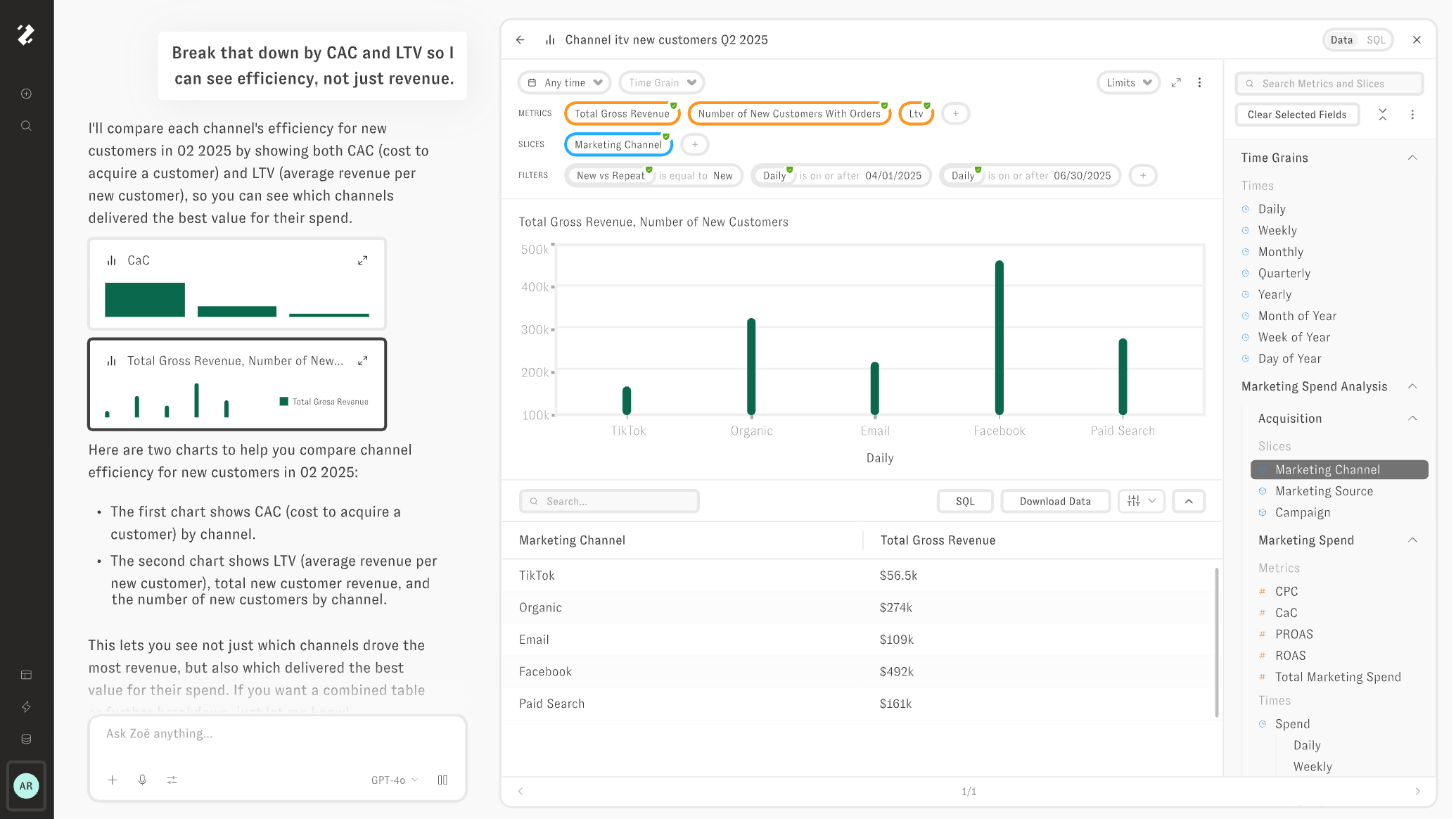
Rich semantic layer Metric promotionZOE is an AI assistant built on a governed Cognitive Layer, a centralized model of metrics and dimensions. ZOE queries this governed layer rather than translating text directly to SQL, and includes a Python sandbox for complex analyses that go beyond standard BI queries.
Key AI capabilities
- Cognitive Layer querying. ZOE queries governed measures and dimensions, producing more consistent results than text-to-SQL approaches.
- Patterns (February 2026). ZOE ingests thousands of past queries and dashboards from your Snowflake query history in a single sync, reducing time-to-value compared to manual configuration.
- Python sandbox. Runs statistical analysis, custom calculations, and data manipulation on governed query results.
- Personal Fields. Users create personal metrics and dimensions that can be promoted to the global model through a review process, one of only two tools (alongside Holistics) with a genuine metric promotion loop.
- Artifacts (March 2026). AI-generated "living documents" (presentations, financial models, data apps) that refresh as underlying data changes.
9. Domo
No semantic layerDomo positions itself as an end-to-end data platform with AI capabilities layered across the stack, from data integration and preparation to visualization and workflow automation.
Key AI capabilities
- Beast Mode AI Writer. Generates calculated fields from natural language.
- AI SQL Assistant. Turns natural language into SQL queries and formulas.
- AI Chat. Ask questions in plain language and get instant answers with suggested visuals.
- FileSets. Turns images, documents, transcripts, and reviews into structured intelligence.
- External model support. Connect to OpenAI, Anthropic, and other model providers.
- 150+ chart types. Drag-and-drop visualization with broad chart coverage.
10. Snowflake Cortex AI
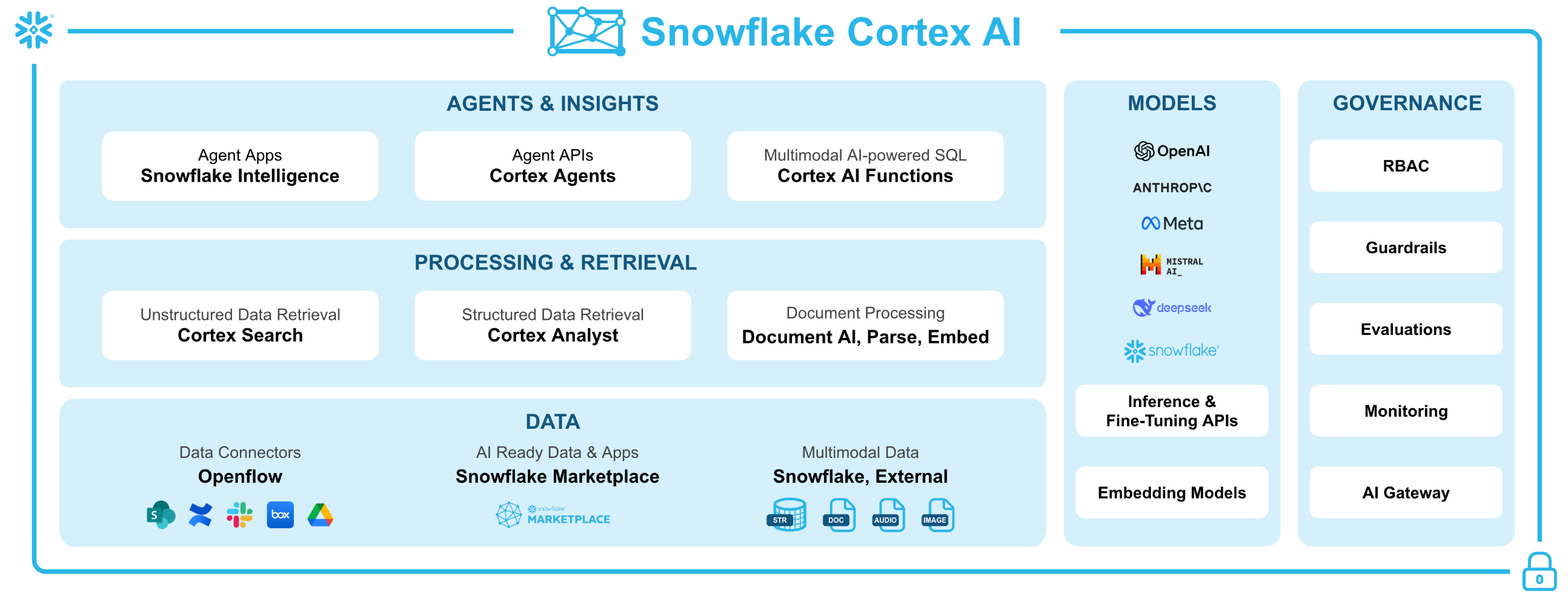
No semantic layerSnowflake Cortex AI brings LLM capabilities directly into the Snowflake data warehouse through SQL functions. Cortex Analyst provides a natural language interface for structured data, while Cortex Search handles unstructured data retrieval.
Key AI capabilities
- Cortex Analyst. Natural language to SQL against a semantic model defined in YAML. Supports multi-turn conversation and produces verifiable SQL.
- LLM Functions. COMPLETE (text generation), EXTRACT (entity extraction), SENTIMENT, SUMMARIZE, and TRANSLATE available as SQL functions directly in queries.
- Cortex Search. Hybrid search over unstructured data with automatic embedding and vector indexing.
- Cortex Fine-Tuning. Fine-tune open-weight LLMs (Llama, Mistral) on proprietary data within Snowflake's security perimeter.
- BYOM support. Choose from multiple Snowflake-hosted models or bring your own.
11. ChatGPT
No semantic layerChatGPT with Code Interpreter (now Advanced Data Analysis) is the most widely used AI analysis tool in the world. It handles file uploads, Python code generation, statistical analysis, and data visualization in a conversational interface.
Key AI capabilities
- Code Interpreter. Generates and executes Python, R, or SQL code on uploaded data. Handles statistical tests (t-tests, regression, ANOVA), time-series analysis, and custom calculations.
- Data connectors. Native connections to Google Drive, OneDrive, and direct file uploads (CSV, Excel, JSON, Parquet).
- Custom GPTs. Build specialized agents with custom instructions, knowledge bases, and API integrations.
- Multi-modal analysis. Processes images, PDFs, and structured data in the same conversation.
- Cross-chat memory. Retains context across conversations for returning users.
12. Claude
No semantic layer MCP supportClaude (by Anthropic) is a general-purpose LLM with strong analytical and coding capabilities, a 200K+ token context window, and native support for the Model Context Protocol (MCP) which allows it to connect to external data tools.
Key AI capabilities
- Large context window. Can process entire datasets, lengthy documents, and complex codebases in a single conversation, useful for analyses that require broad context.
- MCP support. Connects to external tools (including Holistics, databases, and APIs) through the Model Context Protocol, enabling governed data access from within the Claude interface.
- Code generation. Strong Python, SQL, and R generation with careful reasoning and fewer hallucinations than some competitors on analytical tasks.
- Analysis mode. Processes uploaded files (CSV, Excel, JSON) with code execution for statistical analysis and visualization.
- Projects. Organize conversations with persistent context, custom instructions, and shared knowledge bases.
13. Databricks AI
No semantic layerDatabricks brings AI analytics capabilities into its Lakehouse platform through Genie (natural language to SQL), AI/BI Dashboards, and Mosaic AI for model building and deployment.
Key AI capabilities
- Genie. Natural language interface that generates SQL against Unity Catalog governed tables. Supports multi-turn conversation and includes a trust verification step where users can inspect the generated SQL.
- AI/BI Dashboards. Combines a low-code dashboard builder with Genie for natural language querying within dashboards.
- Mosaic AI. Full ML lifecycle management: model training, deployment, monitoring, and compound AI systems (RAG, agent chains).
- Unity Catalog. Centralized governance for data, models, and AI artifacts with fine-grained access control.
- Vector Search. Enterprise-grade similarity search for RAG applications.
How to Choose
The right tool depends on where your constraints are.
If you already have a warehouse and a data team, and you want AI analytics with governed metrics, version control, and a system that improves with use, evaluate Holistics, Looker, and Zenlytic. They prioritize the semantic foundation that makes AI reliable.
If you are locked into a major ecosystem (Microsoft, Salesforce, Google Cloud, Snowflake, Databricks), the native AI features in Power BI, Tableau, Looker, Snowflake Cortex, or Databricks AI will be the lowest-friction option, even if their AI depth is shallower.
If your primary AI use case is non-technical users asking ad-hoc questions, ThoughtSpot Spotter has the strongest natural language search experience.
If you want AI-powered data exploration for individuals or small teams without governance requirements, ChatGPT and Claude are excellent, especially Claude with MCP connecting to a governed BI tool.
And if your real need is ML and predictive analytics alongside BI, Qlik and Databricks offer the broadest combined capability.
The question that cuts across all of these: does the tool produce answers that get more reliable over time, or does every query start from scratch? That is the difference between AI analytics and AI guessing.
Frequently Asked Questions
Do you need a semantic layer for AI analytics?
Yes – the semantic layer is what separates reliable AI analytics from plausible-sounding guesses. Without one, the AI translates natural language directly into SQL against raw tables, inferring meaning from column names and data types. "Revenue" might pull gross revenue in one query and net revenue in the next. A semantic layer defines business metrics once – revenue, active customer, churn rate – so the AI reuses governed definitions instead of reinventing business logic from scratch. Tools without a semantic layer (ChatGPT, Claude, Snowflake Cortex) work for individual exploration but break down when multiple people need consistent answers. The richer the semantic layer, the more complex the questions AI can answer reliably.
What is a metric promotion loop?
A metric promotion loop is a workflow where AI-generated metrics can be reviewed, refined, and promoted into the governed semantic layer so future queries benefit from past work. Without one, every AI-generated insight stays in a chat thread and the next person asking the same question starts over. With a promotion loop, an analyst can take an AI-suggested metric definition, validate it, and add it to the shared data model – making the system smarter with each use. Only two tools in this comparison support a genuine metric promotion loop: Holistics AI and Zenlytic ZOE.
Can ChatGPT replace a BI tool?
No – ChatGPT is excellent for individual ad-hoc analysis, statistical tests, and data prototyping, but it lacks every feature that organizational analytics requires. There is no semantic layer (so metric definitions are inconsistent), no row-level security (so access control is nonexistent), no version control (so there is no audit trail), and no institutional memory (so every conversation starts from zero). ChatGPT works as a research instrument for individual analysts. It fails as organizational infrastructure. For teams that want AI-powered analytics with governance, a dedicated BI tool with a semantic layer is necessary – and Claude's MCP support makes it a strong companion to governed BI tools like Holistics.
What is augmented analytics vs AI analytics?
Augmented analytics is a Gartner-coined term from 2017 describing the use of machine learning to automate data preparation, insight discovery, and sharing – think automated anomaly detection, trend highlighting, and natural language narratives on dashboards. AI analytics is a broader, more recent term that encompasses augmented analytics but extends to conversational querying (asking questions in natural language), AI-generated metric definitions, agentic workflows (AI agents that take actions based on data), and semantic-layer-aware reasoning. In practice, most vendors now use "AI analytics" to describe capabilities that go well beyond what Gartner originally meant by "augmented analytics."
What is an AI analytics platform?
An AI analytics platform is a business intelligence tool that uses artificial intelligence – primarily large language models – to let users query, explore, and analyze data through natural language instead of writing SQL or building charts manually. The core capability is conversational querying: a business user types a question like "what was revenue by region last quarter?" and the platform returns an answer. What separates AI analytics platforms from general-purpose AI tools like ChatGPT is the foundation underneath: a semantic layer that defines business metrics centrally, governance controls like row-level security and version control, and the ability to improve with use. The strongest platforms generate queries against governed metric definitions rather than raw database tables, producing consistent answers across users and teams.
Sources
- Holistics AI Analytics Comparison (May 2026)
- Holistics AI Documentation (May 2026)
- Microsoft Power BI Copilot Documentation (May 2026)
- Tableau AI Documentation (May 2026)
- Looker Gemini Conversational Analytics GA (May 2026)
- ThoughtSpot Spotter Documentation (May 2026)
- Sigma Computing AI Features (May 2026)
- Qlik AI Platform (May 2026)
- Zenlytic ZOE Documentation (May 2026)
- Domo AI Features (May 2026)
- Snowflake Cortex AI Documentation (May 2026)
- Databricks AI/BI Documentation (May 2026)
- Vendr Looker Pricing Data (May 2026)

Data Engineer turned Product; writes SQL for a living.